Summary:- SQL server out of diskspace.
- This cause by replication issue. Replication fail and space in transaction log not release.
-Fix the replication issue with change log reader agent property and restart replication log reader .
value change for log reader agent :
Query Timeout (3600) and ReadBatchSize (100).
-Replication resumed and Transaction log size clear.
Detail:Checking
1. SQL error log
- Replication-Replication Transaction-Log Reader Subsystem: agent servername-dbname-4 scheduled for retry. The process could not execute 'sp_repldone/sp_replcounters' on 'servername'.
2. Replication monitor
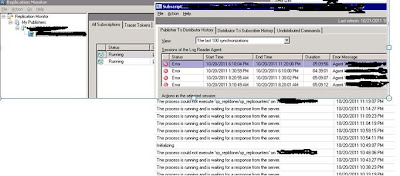
3. Transaction grow very huge, even with backup transaction, the content can't clear
How to solve:
1. From replication monitor->My Publishers->Servername->Right Click ->Agent Profiles->Select log reader agent
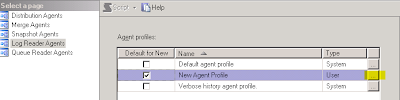
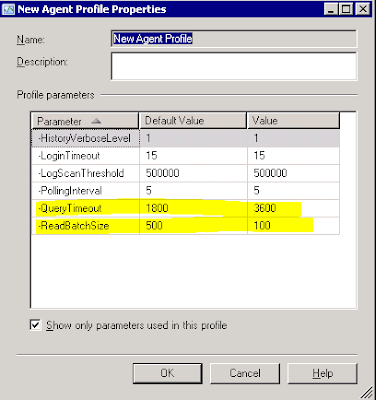
2. Select new agent profile and press OK
3. GO to Job Activity Monitor, restart this job servername-database-4 under Repl-log_reader category
4. GO back to Replication monitor, and you will see
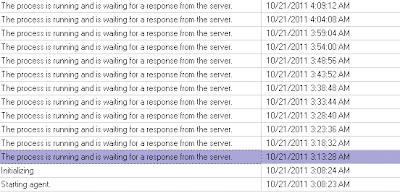
5. 5Before we choose the new agent profiler, “The process is running and waiting for a response from the server” run 6 time and will show error
Agent servername-database-4' is retrying after an error. 185 retries attempted. See agent job history in the Jobs folder for more details.
6. For new log, we see this records more than 6 time ““The process is running and waiting for a response from the server””

7. After log reader finish scan transaction log , replicate start.
8.After replication successful and transaction log start backup, free space of transaction log is resumed
9. Transaction log can be shrink now and free space of the server resumed.
Reference:Reference


