When I create new project in SSIS, it fail and give this message :
"FAIL TO SAVE PACKAGE file error 0x80040155 "interface not registered"
Google and get this answer:
regsvr32 msxml6.dll
regsvr32 msxml3.dll
I run the above in the command prompt and It succesful create Project in SSIS with no error.
Showing posts with label SQL 2005 SSIS. Show all posts
Showing posts with label SQL 2005 SSIS. Show all posts
Thursday, October 21, 2010

Tuesday, May 18, 2010
SSIS - Exception from HRESULT: 0x8007007E
I try to add SSIS to SQL jobs, but it gives me this erorr:
The specified module could not be found. (Exception from HRESULT: 0x8007007E) (SqlManagerUI)
and the SSIS UI no show
The step can be repeat with:
Open Microsoft SQL Server Management Studio ->SQLServerName-> SQL Server Agent-> Job- >right click "new job" -> In General ->keying Job name- > In steps -> Press "New"-> In Type -> Choose "SQL Server Integration Services Package" and the error message will pop out

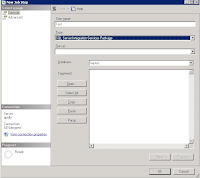
solution
1. My computer- > right click
2. Advance -> environment Variables
3. System variables- > path
** Please change with careful **
let say you have this in path
C:\WINDOWS\system32;C:\WINDOWS
append this line at behind
C:\WINDOWS\system32;C:\WINDOWS;C:\Program Files\Microsoft SQL Server\90\DTS\Binn\
c:\program files\Microsoft SQL Server\90\DTS\Binn\ is the location of DTS\Binn in your server
please replace with the correct path
4. close the UI
5. Close Mircosoft SQL Server Management Studio and reopen it
6. Repeat the step, and no more error.
The above solution work for my server and problem solve.
Reference
http://www.sqlservercentral.com/Forums/Topic278644-148-1.aspx
http://narfle.com/blog/2008/02/ssis-subsystem-failed-to-load.asp
The specified module could not be found. (Exception from HRESULT: 0x8007007E) (SqlManagerUI)
and the SSIS UI no show
The step can be repeat with:
Open Microsoft SQL Server Management Studio ->SQLServerName-> SQL Server Agent-> Job- >right click "new job" -> In General ->keying Job name- > In steps -> Press "New"-> In Type -> Choose "SQL Server Integration Services Package" and the error message will pop out


solution
1. My computer- > right click
2. Advance -> environment Variables
3. System variables- > path
** Please change with careful **
let say you have this in path
C:\WINDOWS\system32;C:\WINDOWS
append this line at behind
C:\WINDOWS\system32;C:\WINDOWS;C:\Program Files\Microsoft SQL Server\90\DTS\Binn\
c:\program files\Microsoft SQL Server\90\DTS\Binn\ is the location of DTS\Binn in your server
please replace with the correct path
4. close the UI
5. Close Mircosoft SQL Server Management Studio and reopen it
6. Repeat the step, and no more error.
The above solution work for my server and problem solve.
Reference
http://www.sqlservercentral.com/Forums/Topic278644-148-1.aspx
http://narfle.com/blog/2008/02/ssis-subsystem-failed-to-load.asp
Friday, July 21, 2006
SQL Server 2005 SSIS
SQL 2005, My first Microsoft SQL Server 2005 Integration Services (SSIS) explore with this sample
1. This SSIS will loop each file in the folder, Extract sample data from the file
2. define Lookup transformation to obtain value of current key and time key
3. Write data to destination file.
Control flow

Data flow
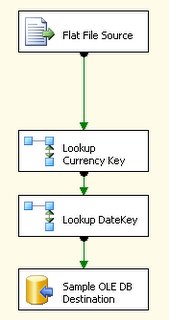
This SSIS exercise and detail explanation can get from "Creating a Simple ETL Package Tutorial" in microsoft website
You also can get Hand on Training for SSIS from microsoft.
1. This SSIS will loop each file in the folder, Extract sample data from the file
2. define Lookup transformation to obtain value of current key and time key
3. Write data to destination file.
Control flow

Data flow


This SSIS exercise and detail explanation can get from "Creating a Simple ETL Package Tutorial" in microsoft website
You also can get Hand on Training for SSIS from microsoft.
Subscribe to:
Posts (Atom)