Thursday, August 01, 2013

Shutdown secondary sqlserver service; 2 nodes with Default Quorum (Node Majority) setup;

Cluster service, 2 nodes (SQL-A,SQL-B) with default Quorum (Node Majority) setup;
SQL Server AG group (alwaysonag) with 2 node (SQL-A, SQL-B)
Test shutdown secondary sqlserver service (SQL-B), will it affect primary replicas (SQL-A)


Shutdown SQL-B, SQLService to simulate SQL-B SQLServer fail

From SQL-A, sql-error log:
- A connection timeout has occurred on a previously established connection to availability replica 'SQL-B' with 'DAF385F5-FE27-4A48-A5DC-7E21214498C7].
Either a networking or a firewall issue exists or the availability replica has transitioned to the resolving role
- AlwaysOn Availability Groups connection with secondary database terminated for primary database 'testing' on the availability replica with Replica ID : {daf385f5-fe27-4a48-a5dc-7e21214498c7}

SQL-A database still ONLINE, from
AlwaysOn High Availability  --Availability Group -- AlwaysONAG --  Availability Replicas
we can see SQL-B replicas is down


SQL AG (alwaysonag) Dashboard


From Availability group state -- Critical --- Critical (1), Warning (3)


Some synchronous replicas are not synchronized
In this availability group, at least one synchronous replica is not currently synchronized. The replica synchronization state could be either SYNCHONIZING or NOT SYNCHRONIZING

Some availability replicas are not synchronizing data
In this availability group, at least one secondary replica has a NOT SYNCHRONIZING synchronization state and is not receiving data from the primary replica

Some availability replicas are disconnected
In this availability group, at least one secondary replica is not connected to the primary replica. The connected state is DISCONNECTED

Availability group is not ready for automatic failover
The availability group is not ready for automatic failover. The primary replica and a secondary replica are configured for automatic failover. however, the secondary replica is not ready for an automatic failover. Possibly the secondary replica is unavailable, or its data synchronization state is currently not in the SYNCHRONIZED synchronization state.

From Availability replica -- Critical (1), Warnings (1)


Start SQLService --SQL-B
From SQL-A, sql-error log:
A connection for availability group 'ALWAYSONAG' from availability replica 'SQL-A' with id [C8B53A5D-75CE-40CC-BB27-50CFBA48CB32] to 'SQL-B' with id [DAF385F5-FE27-4A48-A5DC-7E21214498C7] has been successfully established. This is an informational message only. No user action is required.

AlwaysOn Availability Groups connection with secondary database established for primary database 'testag' on the availability replica with Replica ID :{DAF385F5-FE27-4A48-A5DC-7E21214498C7}. This is an informational message only. No user action is required

AlwaysON Availability Groups connection with secondary database established for primary database 'testag' on the availability replica with Replica ID :{DAF385F5-FE27-4A48-A5DC-7E21214498C7}. This is an informational message only. No user action is required

SQL-B back online in availability Replicas


SQL AG (alwaysonag) dashboard

2 nodes with Default Quorum (Node Majority) setup; Cluster service will sustain with 0 node down

Test cluster service, 2 node with Default Quorum (Node Majority);
What will happen if one of the node down;

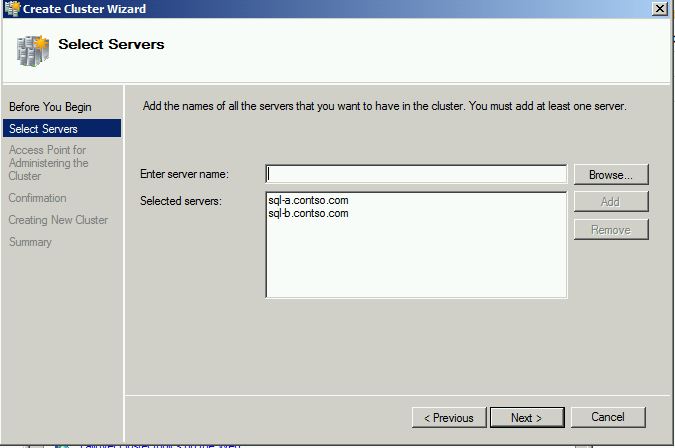
Create a cluster – clustertest.contso.com with 2 node : SQL-C and SQL-D

Default Quorum : Node Majority


More information about quorum
WSFC Quorum Modes and Voting Configuration (SQL Server)http://msdn.microsoft.com/en-us/library/hh270280.aspx#QuorumModes


With Default Quorum (Node Majority) and 2 nodes cluster


Quorum Configuration warning
Node Majority - Warning: Failure of a  node will cause the cluster to fail. Check the status of the nodes


Shutdown SQL-D, simulate SQL-D server fail
System event log at SQL-C


SQL Cluster is missing from Failover Cluster Manager

Bring SQL-D back online
Cluster service - Clustertest.Contso.com back online.


Cluster service will offline, if other node down.
Custer service will sustain with 0 node down.

Tuesday, July 30, 2013

AGL testing - Cluster and Quorum

After Create a cluster, in Quorum Configuration, it give warning
Node Majority - Warning: Failure of node will cause the cluster to fail. Check the status of the nodes.

Check Default Quorum : Node Majority
With the Default Quorum(Node Majority) with 2 node cluster,  Cluster can sustain failure of 0 node(s)


Thursday, May 30, 2013

SET XACT_ABORT ON - Testing

My developer ask me, inside one store procedure, we have 3 statements, if second statement fails, will first statement rollback? Will third statement continuous execute? What if we use begin tran.. commit?

Example
Create procedure tesme
As
INSERT INTO t2 VALUES (1);
INSERT INTO t2 VALUES (2); -- Foreign key error.
INSERT INTO t2 VALUES (3);


If second insert fail, will first insert data rollback? Will sql contineous execute sql statement ?

use tempdb
go
CREATE TABLE t1
    (a INT NOT NULL PRIMARY KEY);
CREATE TABLE t2
    (a INT NOT NULL REFERENCES t1(a));
GO
INSERT INTO t1 VALUES (1);
INSERT INTO t1 VALUES (3);
INSERT INTO t1 VALUES (4);
INSERT INTO t1 VALUES (6);
GO
create procedure testme
as
BEGIN TRANSACTION;
INSERT INTO t2 VALUES (1);
INSERT INTO t2 VALUES (2); -- Foreign key error.
INSERT INTO t2 VALUES (3);
COMMIT TRANSACTION;
GO


exec testme
go
Result :

(1 row(s) affected)
Msg 547, Level 16, State 0, Procedure testme, Line 6
The INSERT statement conflicted with the FOREIGN KEY constraint "FK__t2__a__32C16125". The conflict occurred in database "tempdb", table "dbo.t1", column 'a'.
The statement has been terminated.
(1 row(s) affected)

select * from t2
a
1
3
By Default, first insert didn't rollback and statement 3 been processes, even second insert fail

Check this :
SET XACT_ABORT { ON | OFF }
OFF is the default setting.
http://msdn.microsoft.com/en-us/library/ms188792.aspx

Explanation from mdsn
When SET XACT_ABORT is ON, if a Transact-SQL statement raises a run-time error, the entire transaction is terminated and rolled back.

When SET XACT_ABORT is OFF, in some cases only the Transact-SQL statement that raised the error is rolled back and the transaction continues processing. Depending upon the severity of the error, the entire transaction may be rolled back even when SET XACT_ABORT is OFF. OFF is the default setting.

Compile errors, such as syntax errors, are not affected by SET XACT_ABORT.
From the document, if we didn't define xact_abort in store procedure, the value will for xact_abort = off

By default xact_abort is off, how to check if xact_abort is on or off in current session
DECLARE @options INT
SELECT @options = @@OPTIONS
PRINT @options
IF ( (16384 &@options) = 16384 ) PRINT 'XACT_ABORT'

set xact_abort on
go
DECLARE @options INT
SELECT @options = @@OPTIONS
PRINT @options
IF ( (16384 & @options) = 16384 ) PRINT 'XACT_ABORT'

--reset to default
set xact_abort off


Enabled set xact_abort on inside store procedure
--clear data
delete from t2
go
alter procedure testme
as
set xact_abort on
BEGIN TRANSACTION;
INSERT INTO t2 VALUES (1);
INSERT INTO t2 VALUES (2); -- Foreign key error.
INSERT INTO t2 VALUES (3);
COMMIT TRANSACTION;
GO

exec testme
go
select * from t2 -- return no result

in this example, We enable set xact_abort on in the store procedure
Second statement fails with "The INSERT statement conflicted with the FOREIGN KEY constraint"

when set xact_abort on define in SQL store procedure, if second sql statement fail,
first sql statement will be rollback and third sql statement won't be run(set xact_abort on)


Two transaction in one store procedure
If Second transaction fails, will first transaction rollback
delete from t2
go
alter procedure testme
as
set xact_abort on
BEGIN TRANSACTION;
INSERT INTO t2 VALUES (1);
INSERT INTO t2 VALUES (3);
COMMIT TRANSACTION;
BEGIN TRANSACTION
INSERT INTO t2 VALUES (6); 
INSERT INTO t2 VALUES (8);--this will fail
COMMIT TRANSACTION;
GO

exec testme
go
error :
Msg 547, Level 16, State 0, Procedure testme, Line 9
Msg 547, Level 16, State 0, Procedure testme, Line 10
The INSERT statement conflicted with the FOREIGN KEY constraint "FK__t2__a__4D404D37". The conflict occurred in database "tempdb", table "dbo.t1", column 'a'.

select * from t2
first batch of query been execute and won't rollback
a
1
3
value 6 didn't add into table
Two transaction in one store procedure, If Second transaction fails,only second transaction will be rollback(set xact_abort on)

If First transaction in store procedure fail, will second transaction contienous?
delete from t2
go
alter procedure testme
as
set xact_abort on
BEGIN TRANSACTION
INSERT INTO t2 VALUES (6); 
INSERT INTO t2 VALUES (8);--this will fail
COMMIT TRANSACTION;
BEGIN TRANSACTION;
INSERT INTO t2 VALUES (1);
INSERT INTO t2 VALUES (3);
COMMIT TRANSACTION;
GO
exec testme
go
select * from t2 -- no result return
if first transaction fails, second transaction won't be continuous(set xact_abort on)


If second calling store procedure, will sql rollback dml from first calling store procedure?
delete from t2
go
alter procedure testme
as
set xact_abort on
BEGIN TRANSACTION;
   exec testmecalling
   exec testmecalling2  -- this will fail
COMMIT TRANSACTION;
GO
create procedure testmecalling
as
INSERT INTO t2 VALUES (1);
INSERT INTO t2 VALUES (3);
create procedure testmecalling2
as
INSERT INTO t2 VALUES (6); 
INSERT INTO t2 VALUES (8);
exec testme
go
select * from t2 --no result return


If calling store procedure inside tran..commit, one fail will rollback other (set xact_abort on)

Wednesday, May 29, 2013

Prepare SQL 2012 Exam 70-462

Search for material on 70-462 and found the below:

Exam 462: Administering Microsoft SQL Server 2012 Databases
Video on how to prepare the exam, good sharing - 1 hour

Video


Skills measured
Install and configure (19%)

Details refer to here

Wednesday, May 15, 2013

70-462 Setup SQL 2012 Availability Group

The below setup for Testing on AG setup :
Server configuration
DC 10.10.10.10
SQL-A 10.10.10.20
SQL-B 10.10.10.30
alwaysonAGL - 10.10.10.70
SQL-AlwaysonCL 10.10.10.90

SQLServer service account =SQL cluster

from Failover Cluster->create a cluster

From DC server, sql-alwaysonCL is automatically appear

Enable AG in SQL Server at both node (SQL-A, SQL-B) and restart

Create a database at sql-A
create database Testdatabase1

Criteria for database participant in AG
- auto-close = off

ALTER DATABASE testdatabase1 SET AUTO_CLOSE OFF WITH NO_WAIT

select is_auto_close_on, * from sys.databases where name='testdatabase1'

alter database testdatabase1 set recovery full

SELECT name, recovery_model_desc  FROM sys.databases WHERE name = 'testdatabase1


Backup database Testdatabase1

Backup database testdatabase1 to disk='c:\backup\testdatabase1.bak'

Setup AG

AG setup fail!!Are we missing anything ??
Fail to create Windows Server Failover Clustering (WSFC) resource with name 'alwaysonAG' and
type SQL Server Availability Group'. The resource type is not registered in the WSFC
cluster. The WSFC cluster many have been destroyed and created again. To register the
resource type in the WSFC cluster, disable and then enable alwaysOn in the SQL Server Configuration Manager.
Failed to create availability group 'alwaysonAG'. The operation encountered SQL Server error
41105 and has been rolled back. Check the SQL Server error log for more details. When the
cause of the error has been resolved, retry CREATE AVAILABILITY GROUP command. (Microsoft SQL Server, Error: 41105);


How to solve
From DC server, active directory user and computer
Right click on computer,


Restart SQL Server SQL-A and SQL-B and back to sql-a resetup AG


Add AG Listener

From DC, add sql cluster (SQL service account) into alwaysonCL with full permission

Monday, April 15, 2013

April 2013 SQL Free Resource

15/4/2013
Microsoft TechEd India 2013
All presentations and video recordings of Microsoft TechEd 2013 are now available for viewing and download  here https://india.msteched.com/#agenda

Sunday, April 07, 2013

SQL 2012 AG Failover and Failover Modes

Read this from Microsoft MSDN, and it make me understand how properties of failover modes affect AG failover

SQL 2012 AG Failover and Failover Modes

SQL AG - Availability Mode

I always ask myself why we need set synchronous /asynchronous mode in both primary and secondary group and what happen if synchronous set and secondary down? what will happen to primary.

Today get this answer:
If Primary server Availability mode = asynchronous
- Primary server will no wait for any secondary harden the log and it will commit immediately.
- The secondary will commit asynchronous no matter what mode you're configure on the AG mode in secondary

If Primary server Availability Mode = synchronous,
- Primary server will wait for transaction write into secondary server with AG mode=synchronous before being written to the local log file
- If secondary with synchronous timeout, Primary replica temporarily shifts into asynchronous-commit mode for that secondary replica. When the secondary replica reconnects with the primary replica, they resume synchronous-commit mode


Reference :
Availability Modes

Tuesday, March 26, 2013

SQL server slow with wait_type RESOURCE_SEMAPHORE

SQL Server slow without any reason ? lot timeout complain? if wait_type = RESOURCE_SEMAPHORE , can try this

We have issue when users keep complain their query timeout, query can’t complete
We run some query in SSMS, result return very fast; The server with low CPU, no blocking, no long run query and active connection keep accumulate.

We can try this method and check

--watch for waiter_count
-- if waiter_count> 0, mean query need wait for memory. Normally we should expect this value =0
--resource_semaphore_id = 0 , large query
--resource_semaphore_id=1, small query
 
SELECT waiter_count,grantee_count,* FROM sys.dm_exec_query_resource_semaphores

--if waiter_count>0 all the time, check this
--what query have granted_memory_kb
select granted_memory_kb ,grant_TIME,SESSION_ID,resource_semaphore_id from
sys.dm_exec_query_memory_grants
order by 1 desc

Look for session_id with largest granted_memory,

Check what query is running with this session,
Dbcc inputbuffeR(session_id)

Remember capture hostname, loginame and how long the query already runs.
Sp_who2(session_id)

Good Article :
SQL wait_type RESOURCE_SEMAPHORE troubleshooting

Monday, January 28, 2013

Setup Virtual Server connect to internet (Exam 70-462)


Setup Virtual server in Hyper-V connect to Internet (Exam 70-462)

Setup up External Virtual Switch
From Hyper-V manager, click on Virtual Switch Manager

In Create Virtual Switch Manager, that is 3 options (External;Internal;Private)
External
Creates a virtual switch that binds to the physical network adapter so that virtual machines can access a physical network.
Internal
Creates a virtual switch that can be used only by the virtual machines that run on this physical computer, and between the virtual machines and the physical computer. An internal virtual switch does not provide connectivity to a physical network connection.
Private
Creates a virtual switch that can be used only by the virtual machines that run on this physical computer.

I want setup virtual server to use internet to active my window license, in this case, I create external virtual switch.
 
I change the name to "External" and choose my network card.
 
When I press ok, it give me Apply networking changes warning, I press "Yes"
 
I can see the External Virtual switch created
 
From virtual server-> DC ->Settings
 
I select "Add Legacy Network Adapter" and press "Add"
 
I change Virtual switch option from "Not Connected" to "external"; the virtual switch I created just now and press "ok"


After complete setting, I start my virtual server and virtual server can connect to internet
 
 
The above is for Exam 70-462 lab setting environment.
 

Active Window License in Lab Environment (exam 70-462)

Active Window License in Lab Environment (exam 70-462)
After download window 2008 evaluation and install, we need active window online, else the window will be expired

from command prompt, run this
slmgr.vbs -dli

From computer, properties
 
Press Active Windows online now
 
After minutes, It will show activation was successful


 Check the window activation status, now license is valid for 180 days
 

The above activation for 70-462 lab setting environment.