Sunday, August 30, 2015
Error: 17049, Severity: 16, State: 1. DBCC ErrorLog fail
DBCC ERRORLOG
Error: 17049, Severity: 16, State: 1.
Unable to cycle error log file from 'D:\MSSQL10_50.MSSQLSERVER\MSSQL\Log\ERRORLOG' to 'D:\MSSQL10_50.MSSQLSERVER\MSSQL\Log\ERRORLOG.1' due to OS error '32(The process cannot access the file because it is being used by another process.)'. A process outside of SQL Server may be preventing SQL Server from reading the files. As a result, errorlog entries may be lost and it may not be possible to view some SQL Server errorlogs. Make sure no other processes have locked the file with write-only access."
SELECT *
FROM sys.dm_exec_requests a
OUTER APPLY sys.dm_exec_sql_text(a.sql_handle) b
WHERE session_id > 50
and session_id <> @@spid AND( text = 'xp_readerrorlog' OR text = 'sp_cycle_errorlog')
ORDER BY start_time
kill the spid
rerun DBCC ERRORLOG and it successful
reference : Unable to cycle error log due to lock that will not clear

Friday, August 21, 2015
SQLAgent - TSQL JobStep (Job % to SQL Job Name
SQLAgent - TSQL JobStep (Job % to SQL Job Name
select sp.program_name
from
sys.dm_exec_requests req
left join sys.sysprocesses sp on sp.spid=req.session_id
where (req.session_id>50 or req.session_id is null) and req.session_Id NOT IN (@@SPID)
order by logical_reads
go
program_name
SQLAgent - TSQL JobStep (Job 0x8BF803BD5BFFD3448392075F1E82E037 : Step 1)
what is the job name that execute?
SELECT CASE
WHEN RTRIM([program_name]) LIKE 'SQLAgent - TSQL JobStep (Job %' THEN J.Name
ELSE RTRIM([program_name])
END ProgramName
, Val1.UqID
, Val1.UqIDStr
FROM sys.sysProcesses P
CROSS APPLY
(
VALUES (
CASE
WHEN RTRIM([program_name]) LIKE 'SQLAgent - TSQL JobStep (Job %' THEN
CAST(
SUBSTRING(RTRIM([program_name]), 32, 8) + '-' +
SUBSTRING(RTRIM([program_name]), 40, 4) + '-' +
SUBSTRING(RTRIM([program_name]), 44, 4) + '-' +
SUBSTRING(RTRIM([program_name]), 48, 4) + '-' +
SUBSTRING(RTRIM([program_name]), 52, 12)
AS uniqueidentifier)
ELSE NULL
END ,
CASE
WHEN RTRIM([program_name]) LIKE 'SQLAgent - TSQL JobStep (Job %' THEN
CAST(CONVERT(VARBINARY(MAX),'0x' + SUBSTRING(RTRIM([program_name]), 32, 32),1) AS uniqueidentifier)
ELSE NULL
END
)
) Val1(UqID, UqIDStr)
OUTER APPLY
(
SELECT DISTINCT Name
FROM MSDB.dbo.SysJobs
WHERE CAST(Job_ID AS varchar(50)) = Val1.UqIDStr
OR Job_ID = Val1.UqID
OR CAST(Job_ID AS varchar(50)) = Val1.UqID
) J
WHERE RTRIM([program_name]) ='SQLAgent - TSQL JobStep (Job 0x8BF803BD5BFFD3448392075F1E82E037 : Step 1)'
Extract from
http://www.sqlservercentral.com/Forums/Topic1648616-392-1.aspx
select sp.program_name
from
sys.dm_exec_requests req
left join sys.sysprocesses sp on sp.spid=req.session_id
where (req.session_id>50 or req.session_id is null) and req.session_Id NOT IN (@@SPID)
order by logical_reads
go
program_name
SQLAgent - TSQL JobStep (Job 0x8BF803BD5BFFD3448392075F1E82E037 : Step 1)
what is the job name that execute?
SELECT CASE
WHEN RTRIM([program_name]) LIKE 'SQLAgent - TSQL JobStep (Job %' THEN J.Name
ELSE RTRIM([program_name])
END ProgramName
, Val1.UqID
, Val1.UqIDStr
FROM sys.sysProcesses P
CROSS APPLY
(
VALUES (
CASE
WHEN RTRIM([program_name]) LIKE 'SQLAgent - TSQL JobStep (Job %' THEN
CAST(
SUBSTRING(RTRIM([program_name]), 32, 8) + '-' +
SUBSTRING(RTRIM([program_name]), 40, 4) + '-' +
SUBSTRING(RTRIM([program_name]), 44, 4) + '-' +
SUBSTRING(RTRIM([program_name]), 48, 4) + '-' +
SUBSTRING(RTRIM([program_name]), 52, 12)
AS uniqueidentifier)
ELSE NULL
END ,
CASE
WHEN RTRIM([program_name]) LIKE 'SQLAgent - TSQL JobStep (Job %' THEN
CAST(CONVERT(VARBINARY(MAX),'0x' + SUBSTRING(RTRIM([program_name]), 32, 32),1) AS uniqueidentifier)
ELSE NULL
END
)
) Val1(UqID, UqIDStr)
OUTER APPLY
(
SELECT DISTINCT Name
FROM MSDB.dbo.SysJobs
WHERE CAST(Job_ID AS varchar(50)) = Val1.UqIDStr
OR Job_ID = Val1.UqID
OR CAST(Job_ID AS varchar(50)) = Val1.UqID
) J
WHERE RTRIM([program_name]) ='SQLAgent - TSQL JobStep (Job 0x8BF803BD5BFFD3448392075F1E82E037 : Step 1)'
Extract from
http://www.sqlservercentral.com/Forums/Topic1648616-392-1.aspx
Friday, January 23, 2015
Sharepoint in SQL AGL intermittent timeout
Quote:
Intermittent, unusually high latency might occur when you use availability groups that have replicas that are deployed on multiple subnets.
As a best practice, connections to SharePoint availability groups in a multi-subnet environment should configure specifyMultiSubnetFailover=True to avoid issues caused by high network latency. For more information, see Supporting Availability Group Multi-Subnet Failovers.
Below should run in Sharepoint application server each time create / recreate sharepoint site to make sure multisubnetfailover keyword in add into sharepoint connection string
$dbs = Get-SPDatabase | ?{$_.MultiSubnetFailover -ne $true}
     foreach ($db in $dbs)
     {
          $db.MultiSubnetFailover = $true
           $db.Update()
     }
Reference :
Configure SQL Server 2012 AlwaysOn Availability Groups for SharePoint 2013
Thursday, December 18, 2014
SQL 2014 in-memory Learning reference
Accelerating Application Performance and Gaining Insights with the Microsoft Data Platform
SQL Server In_Memory OLTP Internals Overview
In-Memory nonclustered index for memory optimized tables ?
SQL 2014 Hash index
Guidelines for Using Indexes on Memory-Optimized Tables
Memory-Optimized Tables
Requirements for Using Memory-Optimized Tables
Transact-SQL Constructs Not Supported by In-Memory OLTP
Video
Microsoft SQL Server 2014: In-Memory OLTP Overview
Microsoft SQL Server 2014: In-Memory OLTP for Database Administrators
Channel 9
In-Memory
SQL Server 2014 In-memory OLTP Logging
SQL Server In_Memory OLTP Internals Overview
In-Memory nonclustered index for memory optimized tables ?
SQL 2014 Hash index
Guidelines for Using Indexes on Memory-Optimized Tables
Memory-Optimized Tables
Requirements for Using Memory-Optimized Tables
Transact-SQL Constructs Not Supported by In-Memory OLTP
Video
Microsoft SQL Server 2014: In-Memory OLTP Overview
Microsoft SQL Server 2014: In-Memory OLTP for Database Administrators
Channel 9
In-Memory
SQL Server 2014 In-memory OLTP Logging
Tuesday, November 25, 2014
SQL daily HealthCheck - My Reference
SQL daily Healthcheck
CPU - System CPU, SQL CPU, max CPU, avg CPU
SQL Log Size > 40%? -dbcc sqlperf(LOGSPACE)
SQL Connection - How many connection
SQL Active Connection
Blocking ? any blocking, what is the blocking header?
Deadlock? any deadlock?
Long Run Queries?
Any SQL Job fail?
Last IO Error?
SQL Error log that need attention
DB Size
Disk size
SQL 2005 - mirroring status
SQL 2012/SQL 2014/SQL 2016 : AGL Status
Wednesday, September 03, 2014
SQL Related error
SQL IO related error
1. check SQL Server error log
2. Check OS application error log
3. Check if all the drive on line and writeable
4. Try restart SQL Server if drive back online
OS Application Log
Event ID :833
Source : MSSQLSERVER
SQL Server has encountered <n> occurrence(s) of I/O requests taking longer than 15 seconds to complete on file [<full path of file>] in database [<database name.>] (<dbid>). The OS file handle is <file handle>. The offset of the latest long I/O is: <offset in hexadecimal>
SQL Server logs "Msg 833" when I/O delay problems occur
Event ID : 17053
SQLServerLogMgr::LogWriter: Operating system error 1167(The device is not connected.) encountered.
Event ID :3314
During undoing of a logged operation in database '%', an error occurred at log record ID (53970:95872:3). Typically, the specific failure is logged previously as an error in the Windows Event Log service.
Restore the database or file from a backup, or repair the database
Event ID :9001
The log for database '%' is not available. Check the event log for related error messages.
Resolve any errors and restart the database.
Event ID :3449
SQL Server must shut down in order to recover a database (database ID 2). The database is either a user database that could not be shut down or a system database. Restart SQL Server.
If the database fails to recover after another startup, repair or restore the database.
Event ID:823
The operating system returned error %ls to SQL Server during a %S_MSG at offset % in file '%ls'. Additional messages in the SQL Server error log and system event log may provide more detail. This is a severe system-level error condition that threatens database integrity and must be corrected immediately. Complete a full database consistency check (DBCC CHECKDB). This error can be caused by many factors; for more information, see SQL Server Books Online.
How to troubleshoot a Msg 823 error in SQL Server
Friday, August 29, 2014
Replication - sp_replcmds; Execution of filter stored procedure % failed.
Replication fail with
From Publisher
Replication Monitor
Replication - publisher to Distribution History, we have the below error :
The process could not execute 'sp_replcmds' on '. (Source: MSSQL_REPL, Error number: MSSQL_REPL20011)
Get help: http://help/MSSQL_REPL20011
Execution of filter stored procedure 1820181880 failed. See the SQL Server errorlog for more information. (Source: MSSQLServer, Error number: 18764)
Get help: http://help/18764
The Log-Scan Process failed to construct a replicated command from log sequence number (LSN) {00026ef8:00039201:0004}. Back up the publication database and contact Customer Support Services. (Source: MSSQLServer, Error number: 18805)
Get help: http://help/18805
The process could not execute 'sp_replcmds' on ''. (Source: MSSQL_REPL, Error number: MSSQL_REPL22037)
Get help: http://help/MSSQL_REPL22037
Publisher SQL Server - Error Log
No error
From Publisher, publisher database
run the below query. That might some error in replication filtering.
Select * from sysarticles where filter=1014603790
From SQLServer-> Replication->Local Publication->ReplicationName-> right click -> Properties-> Filter Rows
Check the condition as well
From Publisher
Replication Monitor
Replication - publisher to Distribution History, we have the below error :
The process could not execute 'sp_replcmds' on '
Get help: http://help/MSSQL_REPL20011
Execution of filter stored procedure 1820181880 failed. See the SQL Server errorlog for more information. (Source: MSSQLServer, Error number: 18764)
Get help: http://help/18764
The Log-Scan Process failed to construct a replicated command from log sequence number (LSN) {00026ef8:00039201:0004}. Back up the publication database and contact Customer Support Services. (Source: MSSQLServer, Error number: 18805)
Get help: http://help/18805
The process could not execute 'sp_replcmds' on '
Get help: http://help/MSSQL_REPL22037
Publisher SQL Server - Error Log
No error
From Publisher, publisher database
run the below query. That might some error in replication filtering.
Select * from sysarticles where filter=1014603790
From SQLServer-> Replication->Local Publication->ReplicationName-> right click -> Properties-> Filter Rows
Check the condition as well
Friday, August 15, 2014
Index best practice resource
201408
SQL Server Index Design Guide
SQL Server Best Practices Article - Published 2007
SQL Server 2008 Microsoft Certified Master Readiness Videos
Indexing Strategies
Index Analysis
Indexing Strategies Demonstration
Index Internals
Index Internals Demo
The Clustered Index Debate
why my index seek change to index scan when return result increase - will update
SQL 2012 non cluster column store index - will update
SQL 2014 cluster column store index - will update
SQL Server Index Design Guide
SQL Server Best Practices Article - Published 2007
SQL Server 2008 Microsoft Certified Master Readiness Videos
Indexing Strategies
Index Analysis
Indexing Strategies Demonstration
Index Internals
Index Internals Demo
The Clustered Index Debate
why my index seek change to index scan when return result increase - will update
SQL 2012 non cluster column store index - will update
SQL 2014 cluster column store index - will update
Tuesday, April 01, 2014
Tuesday, February 11, 2014
SQL 2012 - new function
SQL 2012 - new function
Conversion functions
• PARSE
• TRY_CONVERT
• TRY_PARSE
Date and time functions
• DATEFROMPARTS
• DATETIME2FROMPARTS
• DATETIMEFROMPARTS
• DATETIMEOFFSETFROMPARTS
• EOMONTH
• SMALLDATETIMEFROMPARTS
• TIMEFROMPARTS
Logical functions
• CHOOSE
• IIF
String functions
• CONCAT
• FORMAT
Reference : Programmability Enhancements (Database Engine)
Conversion functions
• PARSE
• TRY_CONVERT
• TRY_PARSE
Date and time functions
• DATEFROMPARTS
• DATETIME2FROMPARTS
• DATETIMEFROMPARTS
• DATETIMEOFFSETFROMPARTS
• EOMONTH
• SMALLDATETIMEFROMPARTS
• TIMEFROMPARTS
Logical functions
• CHOOSE
• IIF
String functions
• CONCAT
• FORMAT
Reference : Programmability Enhancements (Database Engine)
Sunday, August 04, 2013
70462 My Virtual server Spec
My computer has the below spec
Intel(R) Core (TM) i7-3612QM CPU @2.10GHZ (8 CPUs)
Memory : 8192MB RAM
Harddisk : 1 TB
OS : Windows 8 Pro 64-bit
My Virtual server setting
Domain Controller (DC) - 1 Virtual Processor, RAM 512, Virtual harddisk - size 127gb (It will expand when disk needed); I DC file size (3 gb)
SQL-A - 1 Virtual Processor, RAM 1 GB, Virtual Harddisk - auto expand as well (11 GB when checking)
SQL-B - 1 Virtual Processor, RAM 1 GB, Virtual Harddisk - auto expand as well (11 GB when checking)
SQL-C - 1 Virtual Processor, RAM 1 GB, Virtual Harddisk - auto expand as well (11 GB when checking)
SQL-D - 1 Virtual Processor, RAM 1 GB, Virtual Harddisk - auto expand as well (11 GB when checking)
Most of the time I only turn On DC, SQL-A, SQL-B and it more then enough for Testing.
Intel(R) Core (TM) i7-3612QM CPU @2.10GHZ (8 CPUs)
Memory : 8192MB RAM
Harddisk : 1 TB
OS : Windows 8 Pro 64-bit
My Virtual server setting
Domain Controller (DC) - 1 Virtual Processor, RAM 512, Virtual harddisk - size 127gb (It will expand when disk needed); I DC file size (3 gb)
SQL-A - 1 Virtual Processor, RAM 1 GB, Virtual Harddisk - auto expand as well (11 GB when checking)
SQL-B - 1 Virtual Processor, RAM 1 GB, Virtual Harddisk - auto expand as well (11 GB when checking)
SQL-C - 1 Virtual Processor, RAM 1 GB, Virtual Harddisk - auto expand as well (11 GB when checking)
SQL-D - 1 Virtual Processor, RAM 1 GB, Virtual Harddisk - auto expand as well (11 GB when checking)
Most of the time I only turn On DC, SQL-A, SQL-B and it more then enough for Testing.
Saturday, August 03, 2013
Quorum - Node and File Share Majority; Shutdown one node
Cluster service, Change Quorum to Node and File Share Majority; Shutdown one node
SQL-B is Primary Replicas

Shutdown SQL-B server, simulate Primary replicas SQL-B fail and see if the database will auto-failover to SQL-A
Cluster service - SQL-ALWAYSONCL.Contso.com still available with warning
SQL-B Node is down

Failover database Happen and SQL-A become Primary Replicas and Availability Database and Availability Group Listeners still can be access

SQL Availability Dashboard
- SQL-A Replicas is online
- SQL-B Replicas is offline

SQL Error log
Availability replica
'SECONDARY_NORMAL' to 'RESOLVING_NORMAL'; to 'PRIMARY_PENDING'; to 'PRIMARY_NORMAL'
Availability database
'SECONDARY' to 'RESOLVING'; Changed to 'PRIMARY'


Start SQL-B server
SQL-B node is back online
Current Host server still SQL-A and failover didn't happen

SQL Server

SQL Availability Dashboard

SQL Error Log (SQL-A)
SQL-B is Primary Replicas

Shutdown SQL-B server, simulate Primary replicas SQL-B fail and see if the database will auto-failover to SQL-A
Cluster service - SQL-ALWAYSONCL.Contso.com still available with warning
SQL-B Node is down

Failover database Happen and SQL-A become Primary Replicas and Availability Database and Availability Group Listeners still can be access
SQL Availability Dashboard
- SQL-A Replicas is online
- SQL-B Replicas is offline

SQL Error log
Availability replica
'SECONDARY_NORMAL' to 'RESOLVING_NORMAL'; to 'PRIMARY_PENDING'; to 'PRIMARY_NORMAL'
Availability database
'SECONDARY' to 'RESOLVING'; Changed to 'PRIMARY'


Start SQL-B server
SQL-B node is back online
Current Host server still SQL-A and failover didn't happen

SQL Server

SQL Availability Dashboard

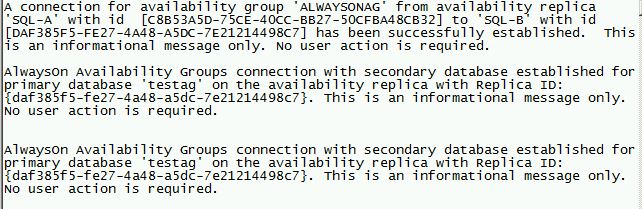
SQL Error Log (SQL-A)
Subscribe to:
Posts (Atom)