When I create new project in SSIS, it fail and give this message :
"FAIL TO SAVE PACKAGE file error 0x80040155 "interface not registered"
Google and get this answer:
regsvr32 msxml6.dll
regsvr32 msxml3.dll
I run the above in the command prompt and It succesful create Project in SSIS with no error.
Thursday, October 21, 2010

Friday, July 02, 2010
Objects in SQL File Group
I want know which object sit in SQL filegroup.
Do some google and found this script to list objects per filegroup
Do some google and found this script to list objects per filegroup
Tuesday, May 18, 2010
SQL Server 2005 Patch Fails to install with an error "Unable to install Windows Installer MSP file"
I try to install SQL 2005 Service Patch 3, but it fail to install
After some Google, find this solution useful. My SQL 2005 SP3 successful install
SQL Server 2005 Patch Fails to install with an error "Unable to install Windows Installer MSP file"
Reference:
Converting a Regular GUID to a Compressed GUID
After some Google, find this solution useful. My SQL 2005 SP3 successful install
SQL Server 2005 Patch Fails to install with an error "Unable to install Windows Installer MSP file"
Reference:
Converting a Regular GUID to a Compressed GUID
SSIS - Exception from HRESULT: 0x8007007E
I try to add SSIS to SQL jobs, but it gives me this erorr:
The specified module could not be found. (Exception from HRESULT: 0x8007007E) (SqlManagerUI)
and the SSIS UI no show
The step can be repeat with:
Open Microsoft SQL Server Management Studio ->SQLServerName-> SQL Server Agent-> Job- >right click "new job" -> In General ->keying Job name- > In steps -> Press "New"-> In Type -> Choose "SQL Server Integration Services Package" and the error message will pop out

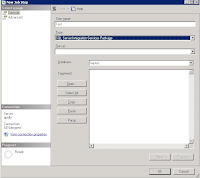
solution
1. My computer- > right click
2. Advance -> environment Variables
3. System variables- > path
** Please change with careful **
let say you have this in path
C:\WINDOWS\system32;C:\WINDOWS
append this line at behind
C:\WINDOWS\system32;C:\WINDOWS;C:\Program Files\Microsoft SQL Server\90\DTS\Binn\
c:\program files\Microsoft SQL Server\90\DTS\Binn\ is the location of DTS\Binn in your server
please replace with the correct path
4. close the UI
5. Close Mircosoft SQL Server Management Studio and reopen it
6. Repeat the step, and no more error.
The above solution work for my server and problem solve.
Reference
http://www.sqlservercentral.com/Forums/Topic278644-148-1.aspx
http://narfle.com/blog/2008/02/ssis-subsystem-failed-to-load.asp
The specified module could not be found. (Exception from HRESULT: 0x8007007E) (SqlManagerUI)
and the SSIS UI no show
The step can be repeat with:
Open Microsoft SQL Server Management Studio ->SQLServerName-> SQL Server Agent-> Job- >right click "new job" -> In General ->keying Job name- > In steps -> Press "New"-> In Type -> Choose "SQL Server Integration Services Package" and the error message will pop out


solution
1. My computer- > right click
2. Advance -> environment Variables
3. System variables- > path
** Please change with careful **
let say you have this in path
C:\WINDOWS\system32;C:\WINDOWS
append this line at behind
C:\WINDOWS\system32;C:\WINDOWS;C:\Program Files\Microsoft SQL Server\90\DTS\Binn\
c:\program files\Microsoft SQL Server\90\DTS\Binn\ is the location of DTS\Binn in your server
please replace with the correct path
4. close the UI
5. Close Mircosoft SQL Server Management Studio and reopen it
6. Repeat the step, and no more error.
The above solution work for my server and problem solve.
Reference
http://www.sqlservercentral.com/Forums/Topic278644-148-1.aspx
http://narfle.com/blog/2008/02/ssis-subsystem-failed-to-load.asp
Wednesday, May 12, 2010
SQL Server Build List
SQL Server 2005 Build list maintain by By Steve Jone in sqlservercentral
http://www.sqlservercentral.com/articles/Administration/2960/
SQL Server 2008 Build list maintain by By Steve Jone in sqlservercentral
http://www.sqlservercentral.com/articles/SQL+Server+2008/63491/
Another Source from sqlsecurity
http://www.sqlsecurity.com/FAQs/SQLServerVersionDatabase/tabid/63/Default.aspx
Microsoft Security -> Select SQL 2005
http://www.microsoft.com/technet/security/current.aspx
http://www.sqlservercentral.com/articles/Administration/2960/
SQL Server 2008 Build list maintain by By Steve Jone in sqlservercentral
http://www.sqlservercentral.com/articles/SQL+Server+2008/63491/
Another Source from sqlsecurity
http://www.sqlsecurity.com/FAQs/SQLServerVersionDatabase/tabid/63/Default.aspx
Microsoft Security -> Select SQL 2005
http://www.microsoft.com/technet/security/current.aspx
Tuesday, March 23, 2010
What SQL job in SQL Server
My x colleague ask me how to query SQL job in SQL Server
Normally I use the below script
use msdb
select name from sysjobs
where enabled=1
Normally I use the below script
use msdb
select name from sysjobs
where enabled=1
Thursday, March 04, 2010
Media - For DBA
From Microsoft TechNet
example of Title :
LINQ and Entity Framework, for the DBA
SQL Services - What does it mean for the DBA
and lot of Real World DBA Episode ...
Find all media here from Microsoft Technet
example of Title :
LINQ and Entity Framework, for the DBA
SQL Services - What does it mean for the DBA
and lot of Real World DBA Episode ...
Find all media here from Microsoft Technet
Thursday, February 18, 2010
SQL Server 2005 ranking functions - RANK(), DENSE_RANK(), NTILE()
http://msdn.microsoft.com/en-us/library/ms189798.aspx
Ranking functions return a ranking value for each row in a partition. Depending on the function that is used, some rows might receive the same value as other rows. Ranking functions are nondeterministic.
Good explanation of ranking function
Good example of ranking function
Ranking functions return a ranking value for each row in a partition. Depending on the function that is used, some rows might receive the same value as other rows. Ranking functions are nondeterministic.
Good explanation of ranking function
Good example of ranking function
Friday, February 12, 2010
SQL Free monitor tools
SQL HeartBeat, Monitor your sql server from SQLSolutions
http://www.sqlsolutions.com/products/Heartbeat/index.html
SQL Check, Monitor your sql server from Idera
http://www.idera.com/Products/Free-Tools/SQL-check/
http://www.sqlsolutions.com/products/Heartbeat/index.html
SQL Check, Monitor your sql server from Idera
http://www.idera.com/Products/Free-Tools/SQL-check/
Monday, January 25, 2010
Login is locked out when enforce password policy is on
MY SQL 2005 login is set with “Enforce password policy” turn on
Check what mean by Enforce password policy:
In Start->Administrative tools->Local Security Settings
Security Settings-> Account Policies -> Account Lockout Policy
Account Lockout threshold - 5 invalid login attempts
If user keying 5 invalid login attempts, account will be lock.
Account lockout duration - 30 minutes
account will be lock for 30 min before automatically becoming unlocked
Reset account lockout counter after 30 minutes
This security setting determines the number of minutes that must elapse after a failed logon attempt before the failed logon attempt counter is reset to 0 bad logon attempts
I use test as login id and keying 5 invalid password.
I try next login with correct password, I can’t login into this SQL 2005 server.

I check from Microsoft SQL Server Management Studio Server name->Security-> test
Double click on test (login name), select Status->Under
Status -> SQL Server authentication ->
"Login is locked" out is checked.
It mean my login account been locked.
I unchecked "account been locked" and press "OK".
I login with the correct password, the login still fail.
I double click the SQL login again, "account been locked" is still "checked"
I unchecked Enforce password policy, unchecked Login is locked out" and press OK.
I login with correct password, but login still fail.
Solution:
1. Change password with TSQL
-ALTER LOGIN test WITH PASSWORD = 'complexpassword',CHECK_POLICY = ON;
-I login with complexpassword, login successful
2. Change password from Microsoft SQL Server Management Studio
-Microsoft SQL Server Management Studio -> Server name->Security-> test
-Double click on test (login name)->General -> Keying new password in Password and Confirm Password and press "OK"
-Double click on test (login name)->Status ->SQL Server authentication: -> Login is locked out
-I login with complexpassword, login successful
Reference
Account lockout duration
Reset account lockout counter after
Check what mean by Enforce password policy:
In Start->Administrative tools->Local Security Settings
Security Settings-> Account Policies -> Account Lockout Policy
Account Lockout threshold - 5 invalid login attempts
If user keying 5 invalid login attempts, account will be lock.
Account lockout duration - 30 minutes
account will be lock for 30 min before automatically becoming unlocked
Reset account lockout counter after 30 minutes
This security setting determines the number of minutes that must elapse after a failed logon attempt before the failed logon attempt counter is reset to 0 bad logon attempts
I use test as login id and keying 5 invalid password.
I try next login with correct password, I can’t login into this SQL 2005 server.

I check from Microsoft SQL Server Management Studio Server name->Security-> test
Double click on test (login name), select Status->Under
Status -> SQL Server authentication ->
"Login is locked" out is checked.
It mean my login account been locked.
I unchecked "account been locked" and press "OK".
I login with the correct password, the login still fail.
I double click the SQL login again, "account been locked" is still "checked"
I unchecked Enforce password policy, unchecked Login is locked out" and press OK.
I login with correct password, but login still fail.
Solution:
1. Change password with TSQL
-ALTER LOGIN test WITH PASSWORD = 'complexpassword',CHECK_POLICY = ON;
-I login with complexpassword, login successful
2. Change password from Microsoft SQL Server Management Studio
-Microsoft SQL Server Management Studio -> Server name->Security-> test
-Double click on test (login name)->General -> Keying new password in Password and Confirm Password and press "OK"
-Double click on test (login name)->Status ->SQL Server authentication: -> Login is locked out
-I login with complexpassword, login successful
Reference
Account lockout duration
Reset account lockout counter after
Friday, January 15, 2010
MSOLAP Provider used in connection string
We move asp page from live server to new setup server.
When asp page connect to our olap server, it show the below message:
Microsoft® OLE DB Provider for OLAP Services
error '80004005' OLAP server error: The operation requested failed due to security problems (the user could not be authenticated).
Our connection string as below and same with live server
provider=msolap;data source=servername;initial catalog=customer;user id=user;password=xxx;sspi=anonymous
After some Google and found this article by my colleague
How to check the MSOLAP Provider used in connection string
Some extraction of article as below:
MSOLAP ---Default Provider
MSOLAP.1 ---OLAP 7.0 Provider (msolap.dll)
MSOLAP.1 ---Analysis Service 2000 Provider (msolap80.dll)
MSOLAP.1 ---SSAS provider (msolap90.dll)
HKCR\MSOLAP ---is the default and used when MSOLAP is selected in the connection string, the file msolap.dll, msolap80.dll or msolap90.dll that is latest registered will be the default.
HKCR\MSOLAP.1 ---is the registry key for OLAP version 7, file msolap.dll
HKCR\MSOLAP.2 ---is the registry key for AS2000, file msolap80.dll
HKCR\MSOLAP.3 ---is the registry key for AS2005, file msolap90.dl
We change the connection string to
provider=msolap.3;data source=servername;initial catalog=customer;user id=user;password=xxx;sspi=anonymous
and it work
When asp page connect to our olap server, it show the below message:
Microsoft® OLE DB Provider for OLAP Services
error '80004005' OLAP server error: The operation requested failed due to security problems (the user could not be authenticated).
Our connection string as below and same with live server
provider=msolap;data source=servername;initial catalog=customer;user id=user;password=xxx;sspi=anonymous
After some Google and found this article by my colleague
How to check the MSOLAP Provider used in connection string
Some extraction of article as below:
MSOLAP ---Default Provider
MSOLAP.1 ---OLAP 7.0 Provider (msolap.dll)
MSOLAP.1 ---Analysis Service 2000 Provider (msolap80.dll)
MSOLAP.1 ---SSAS provider (msolap90.dll)
HKCR\MSOLAP ---is the default and used when MSOLAP is selected in the connection string, the file msolap.dll, msolap80.dll or msolap90.dll that is latest registered will be the default.
HKCR\MSOLAP.1 ---is the registry key for OLAP version 7, file msolap.dll
HKCR\MSOLAP.2 ---is the registry key for AS2000, file msolap80.dll
HKCR\MSOLAP.3 ---is the registry key for AS2005, file msolap90.dl
We change the connection string to
provider=msolap.3;data source=servername;initial catalog=customer;user id=user;password=xxx;sspi=anonymous
and it work
SQL process, percentage of complete
I restore one database and want know how many percent the SQL process will be complete?
Step
1. Restore database test from disk='c:\test.mdf'
2. We can check which session belong to this process with running the below command
sp_who2 'active'
3. Check on command column, and look for "Restore database"
My SPID for this "Restore database" = 57
4. Run the below command and look for session_id=57
Select session_id,percent_complete,estimated_completion_time,total_elapsed_time
From sys.dm_exec_requests
Where session_id=57
session_id percent_complete estimated_completion_time total_elapsed_time
---------- ---------------- ------------------------- ------------------
57 26.47547 5800366 2090266
The above result show the SQL process already complete 26.47%, estimated_completion_time=5800366 and total_elapsed_time=2090266
This above example is use to show how to use sys.dm_exec_requests to show how many percent_complete of SQL process.
We can also run the below command to show percentage complete of restore process.
Restore database test from disk='c:\test.mdf' with stats
10 percent processed.
20 percent processed.
30 percent processed.
....
Step
1. Restore database test from disk='c:\test.mdf'
2. We can check which session belong to this process with running the below command
sp_who2 'active'
3. Check on command column, and look for "Restore database"
My SPID for this "Restore database" = 57
4. Run the below command and look for session_id=57
Select session_id,percent_complete,estimated_completion_time,total_elapsed_time
From sys.dm_exec_requests
Where session_id=57
session_id percent_complete estimated_completion_time total_elapsed_time
---------- ---------------- ------------------------- ------------------
57 26.47547 5800366 2090266
The above result show the SQL process already complete 26.47%, estimated_completion_time=5800366 and total_elapsed_time=2090266
This above example is use to show how to use sys.dm_exec_requests to show how many percent_complete of SQL process.
We can also run the below command to show percentage complete of restore process.
Restore database test from disk='c:\test.mdf' with stats
10 percent processed.
20 percent processed.
30 percent processed.
....
Tuesday, December 01, 2009
Disable SQL Guest user
For SQL 2005
1.
Microsoft SQL Server Management Studio -> SQLServer name-> database -> database name-> right click -> property - >Permission
User/roles -> select guest -> un-check "connect"
2.
USE
GO
REVOKE CONNECT FROM GUEST
GO
Reference
SQL Server Database Guest User Account
1.
Microsoft SQL Server Management Studio -> SQLServer name-> database -> database name-> right click -> property - >Permission
User/roles -> select guest -> un-check "connect"
2.
USE
GO
REVOKE CONNECT FROM GUEST
GO
Reference
SQL Server Database Guest User Account
Subscribe to:
Comments (Atom)