Monday, January 28, 2013

Virtual Server auto-shutdown

My virtual server auto-shutdown and I don't know why
Google and found this
hyper-v virtual server will sometime auto shutdown unexpected without any error or massage.

Virtual server auto shutdown maybe because Windows 2008 evaluation expired.

I try the instruction in this page to extend the evaluation period
How to extend the Windows Server 2008 evaluation period

slmgr.vbs -dli to check current window evaluation status.
slmgr.vbs –rearm, to reset evaluation period to 60 days

After I reset evaluation and restart virtual server, I rerun slmgr.vbs -dli to check the status again
It ONLY extend 10 days !

Friday, January 11, 2013

SQL January free resource


JAN 2013
Video watched
Performance and Query Optimizations in SQL Server 2012
Published Date: December 03, 2012
Presented By:  Bob Beauchemin

High Availability for SQL Server Replication using Database Mirroring
Discuss on Providing High Availability for SQL Server Transactional Replictaion using Database Mirroring
Source : channel9.msdn.com


Article/Whitepaper readed
When to Break Down Complex Queries
Problematic query scenario/ example and how to solve.
Published Date:21 Oct 2011

Friday, December 28, 2012

70-462 Virtual Server Preparation

70-462 Virtual Server Preparation
In this session : Virtualization Hardware Requirements,

Virtual Server, we need,
8.0 GB of RAM.
80 GB of available hard disk space if you are using differencing virtual hard disks.

I using Hyper-V and follow this instruction to create Parent Configuration and Child server can be created using Parent Configuration.

We can install server OS once and use it to create another 5 servers which required in the lab

Follow all the instruction on the site and it will prepare us to next step of Setup Lab (Domain Controller and other SQL Server)

This is My Virtual Server Configuration

Thursday, September 06, 2012

Free ebooks for many different technologies

Free ebooks for many different technologies


I download the below topic for SQL
Microsoft SQL Server AlwaysOn Solutions Guide for High Availability and Disaster Recovery

Transact-SQL Data Manipulation Language (DML) Reference
SQL Server 2012 Developer Training Kit
Introducing Microsoft SQL Server 2012

September Free online SQL Training video

Found out this Free SQL Training: until September 11th


You can watch the below three courses free, each of which are 4+ hours long, are:


•SQL Server: Performance Tuning Using Wait Statistics (by Pauls Randal)

•SQL Server: Transact-SQL Basic Data Retrieval (by Joe)

•SQL Server: Collecting and Analyzing Trace Data (by Jonathan)


1. To sign up for this, all you have to do is follow SQLskills and Pluralsight on Twitter

Sign up at: http://pluralsight.com/training/TwitterOffer/sqlskills


2. You will get a registration code from your direct message in twitter, sit back and learn. The special-offer sign-up is available until September 11th,

3. You have 30 days from when you sign up to view the three courses.

source: SQLSKills

Tuesday, August 14, 2012

Replication - find replication error command

Find Replication error command :
from distribution database, Keying publisherDB name and commandId

declare @PublisherDB sysname,
@PublisherDBID int,@SeqNo nchar(22),@CommandID int

-- Set publisher database name and values from Replication Monitor
set @PublisherDB='publisherdatabasename'

--Set @SeqNo = N'0x0000030100001D68000A0000000'
--Set @CommandID=956
Set @SeqNo = N'valuefromreplicationmonitor'
Set @CommandID ='value from replicationmonitor'

select top 1 @PublisherDBID =publisher_database_id from MSdistribution_agents(nolock)
where publisher_db=@PublisherDB
-- Get the command
Exec sp_browsereplcmds
@xact_seqno_start = @SeqNo,
@xact_seqno_end = @SeqNo,
@command_id = @CommandID,
@publisher_database_id=@PublisherDBID;

In result return, look for command column

Monday, August 13, 2012

SQL Reporting service - move reporting database


Resource 
Create the RSExecRole
"Reporting Services uses a predefined database role called RSExecRole to grant report server permissions to the report server database. The RSExecRole role is created automatically with the report server database. As a rule, you should never modify it or assign other users to the role. However, when you move a report server database to a new or different SQL Server Database Engine, must re-create the role in the Master and MSDB system databases. "
  This page show how to manual create RSExecRole database role in MSDB and Masater database. Assign all permission in the database role - RSExecRole.

I create RSExecRole manually in my Mirroring database before I failover.

Moving the Report Server Databases to Another Computer
- Detaching and Attaching the Report Server Databases

- Backing Up and Restoring the Report Server Databases

Initialize a Report Server - Mircosoft
Understand how Reporting Service creates and stores a symmetric key used for encryption.


Reporting Service - Encryption Key - Mircosoft

How to: Migrate a Reporting Services Installation
Step to setp to migrate a reporting service

BLOG..
Progress on Reporting Services Failover (SQL 2008 R2 SSRS Failover) - Dataman in LasVegas
Reporting service is turn on at both Principle and mirroring reporting database, Restore encryption key on both sqlserver as well

Migrating SQL Reporting Services to a new server by moving the Reporting Services databases - www.mssqltips.com, Dale Kelly
Step by Step with UI

Thursday, February 02, 2012

Replication Case Studies

Replication Whitepaper
Using Replication for High Availability and Disaster Recovery: A SQL Server 2008 Technical Case Study and Best Practices. SQL Server Technical Article and Best ...
http://download.microsoft.com/download/d/9/4/d948f981-926e-40fa-a026-5bfcf076d9b9/Replication_HADR_CaseStudy.docx

Tuesday, January 17, 2012

SQL Data type, Varchar without N

When we declare variable as varchar, we will :
Declare part as varhcar(20)

What if we declare varchar without indicate the length?
Declare part as varchar


See the below example :

DECLARE @myVariable AS varchar
DECLARE @myNextVariable AS varchar(10)
SET @myVariable = 'abc'
SET @myNextVariable = 'abc'
SELECT DATALENGTH(@myVariable), DATALENGTH(@myNextVariable);
--result    1           3
SELECT @myVariable, @myNextVariable;
--result a    abc
GO


Remarks
When n is not specified in a data definition or variable declaration statement, the default length is 1.
When n is not specified when using the CAST and CONVERT functions, the default length is 30.


Examples:
SPROC_TEST 'FINAL'

Create  PROCEDURE [dbo].[SPROC_TEST]
@submission_type VARCHAR -- START, FINAL
AS
print @submission_type
BEGIN
     IF  @submission_type='FINAL'
        PRINT 'A'
      ELSE
        PRINT 'B'
END


We pass parameter as ‘FINAL’ and expected “A’ will be printed,
We will get result result ‘B’ (not as expected), because value in @submission_type been truncate to “F”

Reference
http://msdn.microsoft.com/en-us/library/ms176089.aspx

Monday, November 14, 2011

Free ebook - Troubleshooting SQL Server: A Guide for the Accidental DBA

Wait for this ebook ( "Troubleshooting SQL Server: A Guide for the Accidental DBA") from Jonathan Kehayias for few weeks and I receive newsletter from Simple-Talk today!
Quote from Simple Talk

"
•Understand how to approach troubleshooting and the essential tools you need.
•Explore the areas where problems regularly arise and the tools you can use to diagnose them.
•Get practical solutions to remove the root causes of issues, rather than "papering over the cracks".
"


You can download the ebook from here
You should subscribe newsletter from Simple-Talk

Friday, October 28, 2011

SQL Denali Resource

Free Ebook
Introducing Microsoft SQL Server Code Name “Denali” (DRAFT Preview)


Free Resource download from Microsoft.com
Microsoft® SQL Server® code name 'Denali', Community Technology Preview 3 (CTP 3) Product Guide
Download the datasheets, white papers, technical presentations, demonstrations, and links to videos that will help you evaluate Microsoft® SQL Server® code name 'Denali.'

*Added 7/Feb/2012
SQL Server Virtual Lab
http://www.microsoft.com/sqlserver/en/us/learning-center/virtual-labs.aspx?WT.mc_id=soc-n-[TR]-loc-[Services]-[farukc]

Saturday, October 22, 2011

replication issue 'sp_repldone/sp_replcounters'

Summary:- SQL server out of diskspace.
- This cause by replication issue. Replication fail and space in transaction log not release.
-Fix the replication issue with change log reader agent property and restart replication log reader .
value change for log reader agent :
Query Timeout (3600) and ReadBatchSize (100).
-Replication resumed and Transaction log size clear.

Detail:
Checking
1. SQL error log
- Replication-Replication Transaction-Log Reader Subsystem: agent servername-dbname-4 scheduled for retry. The process could not execute 'sp_repldone/sp_replcounters' on 'servername'.

2. Replication monitor
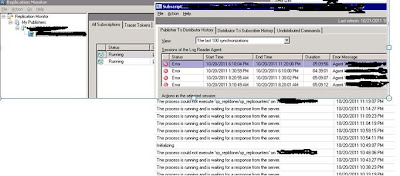

3. Transaction grow very huge, even with backup transaction, the content can't clear

How to solve:
1. From replication monitor->My Publishers->Servername->Right Click ->Agent Profiles->Select log reader agent
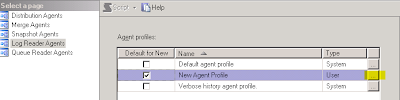
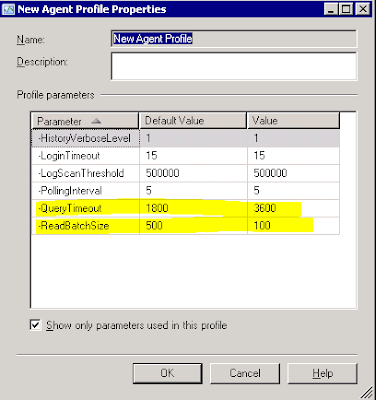


2. Select new agent profile and press OK

3. GO to Job Activity Monitor, restart this job servername-database-4 under Repl-log_reader category

4. GO back to Replication monitor, and you will see
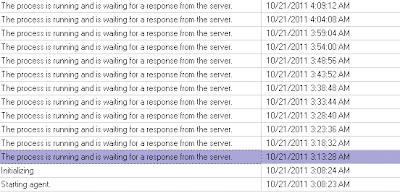


5. 5Before we choose the new agent profiler, “The process is running and waiting for a response from the server” run 6 time and will show error
Agent servername-database-4' is retrying after an error. 185 retries attempted. See agent job history in the Jobs folder for more details.

6. For new log, we see this records more than 6 time ““The process is running and waiting for a response from the server””



7. After log reader finish scan transaction log , replicate start.
8.After replication successful and transaction log start backup, free space of transaction log is resumed
9. Transaction log can be shrink now and free space of the server resumed.


Reference:Reference