If you still using SQL 2005, or want to learn the below topic, go to download PSS Service Center Lab 2005
Blocking and Deadlocking
In these labs you will use SQLDiag, SQL Profiler, and various DMVs to solve blocking and deadlocking problems.
Performance
In these labs you will use SQLDiag, SQL Profiler, showplan, and ReadTrace to solve various query performance problems.
Debugging
In these labs you will learn more about debugging tools used by the PSS team such as SQLDumper and Windows Debugging Tools to solve problems like a crash of SQL Server.
Server and Data Recovery
In these labs you will learn to how to solve various server and database offline problems.
Friday, November 26, 2010

Friday, November 12, 2010
Netvault - Failed to Open file exclusions file
I using Netvault Backup to backup my database.
The Netvault backup has an option where we can exclude file with certain extention
I add a file with extention list want to exclude in backup
When Netvault start backup, it give this message :
Backup completed with warnings
I check Netvault log and found this
A problem occurred initializing items to exclude from the backup: "Failed to open file exclusions file 'c:\file\exclude.txt"
A problem occurred initializing items to exclude from the backup: "File exclusions file 'c:\file\exclude.txt" is not a valid Unicode file
Solve with :
Open and save exclude.txt as unicode file and backup successful without warning
The Netvault backup has an option where we can exclude file with certain extention
I add a file with extention list want to exclude in backup
When Netvault start backup, it give this message :
Backup completed with warnings
I check Netvault log and found this
A problem occurred initializing items to exclude from the backup: "Failed to open file exclusions file 'c:\file\exclude.txt"
A problem occurred initializing items to exclude from the backup: "File exclusions file 'c:\file\exclude.txt" is not a valid Unicode file
Solve with :
Open and save exclude.txt as unicode file and backup successful without warning
Friday, October 22, 2010
Query running in SQL Server
I use this sript to check what query is running in server
select r.blocking_session_id,r.session_id ,h.text,substring(h.text, (r.statement_start_offset/2)+1 , ((case r.statement_end_offset when -1 then datalength(h.text)
else r.statement_end_offset end - r.statement_start_offset)/2) + 1) as text , r.wait_type, r.wait_time , r.last_wait_type , r.wait_resource ,
r.command , r.database_id , r.granted_query_memory, r.reads , r.writes , r.row_count , s.[host_name] , s.program_name , s.login_name
from sys.dm_exec_sessions as s
inner join sys.dm_exec_requests as r on s.session_id =r.session_id and s.last_request_start_time=r.start_time
CROSS APPLY sys.dm_exec_sql_text(r.sql_handle) h where is_user_process = 1 order by 2 desc
select r.blocking_session_id,r.session_id ,h.text,substring(h.text, (r.statement_start_offset/2)+1 , ((case r.statement_end_offset when -1 then datalength(h.text)
else r.statement_end_offset end - r.statement_start_offset)/2) + 1) as text , r.wait_type, r.wait_time , r.last_wait_type , r.wait_resource ,
r.command , r.database_id , r.granted_query_memory, r.reads , r.writes , r.row_count , s.[host_name] , s.program_name , s.login_name
from sys.dm_exec_sessions as s
inner join sys.dm_exec_requests as r on s.session_id =r.session_id and s.last_request_start_time=r.start_time
CROSS APPLY sys.dm_exec_sql_text(r.sql_handle) h where is_user_process = 1 order by 2 desc
Thursday, October 21, 2010
SQL 2005 SSIS FAIL TO SAVE PACKAGE file error 0x80040155 "interface not registered"
When I create new project in SSIS, it fail and give this message :
"FAIL TO SAVE PACKAGE file error 0x80040155 "interface not registered"
Google and get this answer:
regsvr32 msxml6.dll
regsvr32 msxml3.dll
I run the above in the command prompt and It succesful create Project in SSIS with no error.
"FAIL TO SAVE PACKAGE file error 0x80040155 "interface not registered"
Google and get this answer:
regsvr32 msxml6.dll
regsvr32 msxml3.dll
I run the above in the command prompt and It succesful create Project in SSIS with no error.
Friday, July 02, 2010
Objects in SQL File Group
I want know which object sit in SQL filegroup.
Do some google and found this script to list objects per filegroup
Do some google and found this script to list objects per filegroup
Tuesday, May 18, 2010
SQL Server 2005 Patch Fails to install with an error "Unable to install Windows Installer MSP file"
I try to install SQL 2005 Service Patch 3, but it fail to install
After some Google, find this solution useful. My SQL 2005 SP3 successful install
SQL Server 2005 Patch Fails to install with an error "Unable to install Windows Installer MSP file"
Reference:
Converting a Regular GUID to a Compressed GUID
After some Google, find this solution useful. My SQL 2005 SP3 successful install
SQL Server 2005 Patch Fails to install with an error "Unable to install Windows Installer MSP file"
Reference:
Converting a Regular GUID to a Compressed GUID
SSIS - Exception from HRESULT: 0x8007007E
I try to add SSIS to SQL jobs, but it gives me this erorr:
The specified module could not be found. (Exception from HRESULT: 0x8007007E) (SqlManagerUI)
and the SSIS UI no show
The step can be repeat with:
Open Microsoft SQL Server Management Studio ->SQLServerName-> SQL Server Agent-> Job- >right click "new job" -> In General ->keying Job name- > In steps -> Press "New"-> In Type -> Choose "SQL Server Integration Services Package" and the error message will pop out

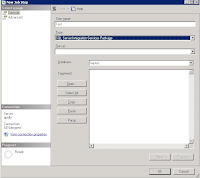
solution
1. My computer- > right click
2. Advance -> environment Variables
3. System variables- > path
** Please change with careful **
let say you have this in path
C:\WINDOWS\system32;C:\WINDOWS
append this line at behind
C:\WINDOWS\system32;C:\WINDOWS;C:\Program Files\Microsoft SQL Server\90\DTS\Binn\
c:\program files\Microsoft SQL Server\90\DTS\Binn\ is the location of DTS\Binn in your server
please replace with the correct path
4. close the UI
5. Close Mircosoft SQL Server Management Studio and reopen it
6. Repeat the step, and no more error.
The above solution work for my server and problem solve.
Reference
http://www.sqlservercentral.com/Forums/Topic278644-148-1.aspx
http://narfle.com/blog/2008/02/ssis-subsystem-failed-to-load.asp
The specified module could not be found. (Exception from HRESULT: 0x8007007E) (SqlManagerUI)
and the SSIS UI no show
The step can be repeat with:
Open Microsoft SQL Server Management Studio ->SQLServerName-> SQL Server Agent-> Job- >right click "new job" -> In General ->keying Job name- > In steps -> Press "New"-> In Type -> Choose "SQL Server Integration Services Package" and the error message will pop out


solution
1. My computer- > right click
2. Advance -> environment Variables
3. System variables- > path
** Please change with careful **
let say you have this in path
C:\WINDOWS\system32;C:\WINDOWS
append this line at behind
C:\WINDOWS\system32;C:\WINDOWS;C:\Program Files\Microsoft SQL Server\90\DTS\Binn\
c:\program files\Microsoft SQL Server\90\DTS\Binn\ is the location of DTS\Binn in your server
please replace with the correct path
4. close the UI
5. Close Mircosoft SQL Server Management Studio and reopen it
6. Repeat the step, and no more error.
The above solution work for my server and problem solve.
Reference
http://www.sqlservercentral.com/Forums/Topic278644-148-1.aspx
http://narfle.com/blog/2008/02/ssis-subsystem-failed-to-load.asp
Wednesday, May 12, 2010
SQL Server Build List
SQL Server 2005 Build list maintain by By Steve Jone in sqlservercentral
http://www.sqlservercentral.com/articles/Administration/2960/
SQL Server 2008 Build list maintain by By Steve Jone in sqlservercentral
http://www.sqlservercentral.com/articles/SQL+Server+2008/63491/
Another Source from sqlsecurity
http://www.sqlsecurity.com/FAQs/SQLServerVersionDatabase/tabid/63/Default.aspx
Microsoft Security -> Select SQL 2005
http://www.microsoft.com/technet/security/current.aspx
http://www.sqlservercentral.com/articles/Administration/2960/
SQL Server 2008 Build list maintain by By Steve Jone in sqlservercentral
http://www.sqlservercentral.com/articles/SQL+Server+2008/63491/
Another Source from sqlsecurity
http://www.sqlsecurity.com/FAQs/SQLServerVersionDatabase/tabid/63/Default.aspx
Microsoft Security -> Select SQL 2005
http://www.microsoft.com/technet/security/current.aspx
Tuesday, March 23, 2010
What SQL job in SQL Server
My x colleague ask me how to query SQL job in SQL Server
Normally I use the below script
use msdb
select name from sysjobs
where enabled=1
Normally I use the below script
use msdb
select name from sysjobs
where enabled=1
Thursday, March 04, 2010
Media - For DBA
From Microsoft TechNet
example of Title :
LINQ and Entity Framework, for the DBA
SQL Services - What does it mean for the DBA
and lot of Real World DBA Episode ...
Find all media here from Microsoft Technet
example of Title :
LINQ and Entity Framework, for the DBA
SQL Services - What does it mean for the DBA
and lot of Real World DBA Episode ...
Find all media here from Microsoft Technet
Thursday, February 18, 2010
SQL Server 2005 ranking functions - RANK(), DENSE_RANK(), NTILE()
http://msdn.microsoft.com/en-us/library/ms189798.aspx
Ranking functions return a ranking value for each row in a partition. Depending on the function that is used, some rows might receive the same value as other rows. Ranking functions are nondeterministic.
Good explanation of ranking function
Good example of ranking function
Ranking functions return a ranking value for each row in a partition. Depending on the function that is used, some rows might receive the same value as other rows. Ranking functions are nondeterministic.
Good explanation of ranking function
Good example of ranking function
Friday, February 12, 2010
SQL Free monitor tools
SQL HeartBeat, Monitor your sql server from SQLSolutions
http://www.sqlsolutions.com/products/Heartbeat/index.html
SQL Check, Monitor your sql server from Idera
http://www.idera.com/Products/Free-Tools/SQL-check/
http://www.sqlsolutions.com/products/Heartbeat/index.html
SQL Check, Monitor your sql server from Idera
http://www.idera.com/Products/Free-Tools/SQL-check/
Monday, January 25, 2010
Login is locked out when enforce password policy is on
MY SQL 2005 login is set with “Enforce password policy” turn on
Check what mean by Enforce password policy:
In Start->Administrative tools->Local Security Settings
Security Settings-> Account Policies -> Account Lockout Policy
Account Lockout threshold - 5 invalid login attempts
If user keying 5 invalid login attempts, account will be lock.
Account lockout duration - 30 minutes
account will be lock for 30 min before automatically becoming unlocked
Reset account lockout counter after 30 minutes
This security setting determines the number of minutes that must elapse after a failed logon attempt before the failed logon attempt counter is reset to 0 bad logon attempts
I use test as login id and keying 5 invalid password.
I try next login with correct password, I can’t login into this SQL 2005 server.

I check from Microsoft SQL Server Management Studio Server name->Security-> test
Double click on test (login name), select Status->Under
Status -> SQL Server authentication ->
"Login is locked" out is checked.
It mean my login account been locked.
I unchecked "account been locked" and press "OK".
I login with the correct password, the login still fail.
I double click the SQL login again, "account been locked" is still "checked"
I unchecked Enforce password policy, unchecked Login is locked out" and press OK.
I login with correct password, but login still fail.
Solution:
1. Change password with TSQL
-ALTER LOGIN test WITH PASSWORD = 'complexpassword',CHECK_POLICY = ON;
-I login with complexpassword, login successful
2. Change password from Microsoft SQL Server Management Studio
-Microsoft SQL Server Management Studio -> Server name->Security-> test
-Double click on test (login name)->General -> Keying new password in Password and Confirm Password and press "OK"
-Double click on test (login name)->Status ->SQL Server authentication: -> Login is locked out
-I login with complexpassword, login successful
Reference
Account lockout duration
Reset account lockout counter after
Check what mean by Enforce password policy:
In Start->Administrative tools->Local Security Settings
Security Settings-> Account Policies -> Account Lockout Policy
Account Lockout threshold - 5 invalid login attempts
If user keying 5 invalid login attempts, account will be lock.
Account lockout duration - 30 minutes
account will be lock for 30 min before automatically becoming unlocked
Reset account lockout counter after 30 minutes
This security setting determines the number of minutes that must elapse after a failed logon attempt before the failed logon attempt counter is reset to 0 bad logon attempts
I use test as login id and keying 5 invalid password.
I try next login with correct password, I can’t login into this SQL 2005 server.

I check from Microsoft SQL Server Management Studio Server name->Security-> test
Double click on test (login name), select Status->Under
Status -> SQL Server authentication ->
"Login is locked" out is checked.
It mean my login account been locked.
I unchecked "account been locked" and press "OK".
I login with the correct password, the login still fail.
I double click the SQL login again, "account been locked" is still "checked"
I unchecked Enforce password policy, unchecked Login is locked out" and press OK.
I login with correct password, but login still fail.
Solution:
1. Change password with TSQL
-ALTER LOGIN test WITH PASSWORD = 'complexpassword',CHECK_POLICY = ON;
-I login with complexpassword, login successful
2. Change password from Microsoft SQL Server Management Studio
-Microsoft SQL Server Management Studio -> Server name->Security-> test
-Double click on test (login name)->General -> Keying new password in Password and Confirm Password and press "OK"
-Double click on test (login name)->Status ->SQL Server authentication: -> Login is locked out
-I login with complexpassword, login successful
Reference
Account lockout duration
Reset account lockout counter after
Subscribe to:
Posts (Atom)